Kubernetes Misconfiguration Myths: What Actually Exposes Your Cluster
Assuming network policies or read-only filesystems stop attackers ignores how container runtimes and service accounts bypass these controls entirely.

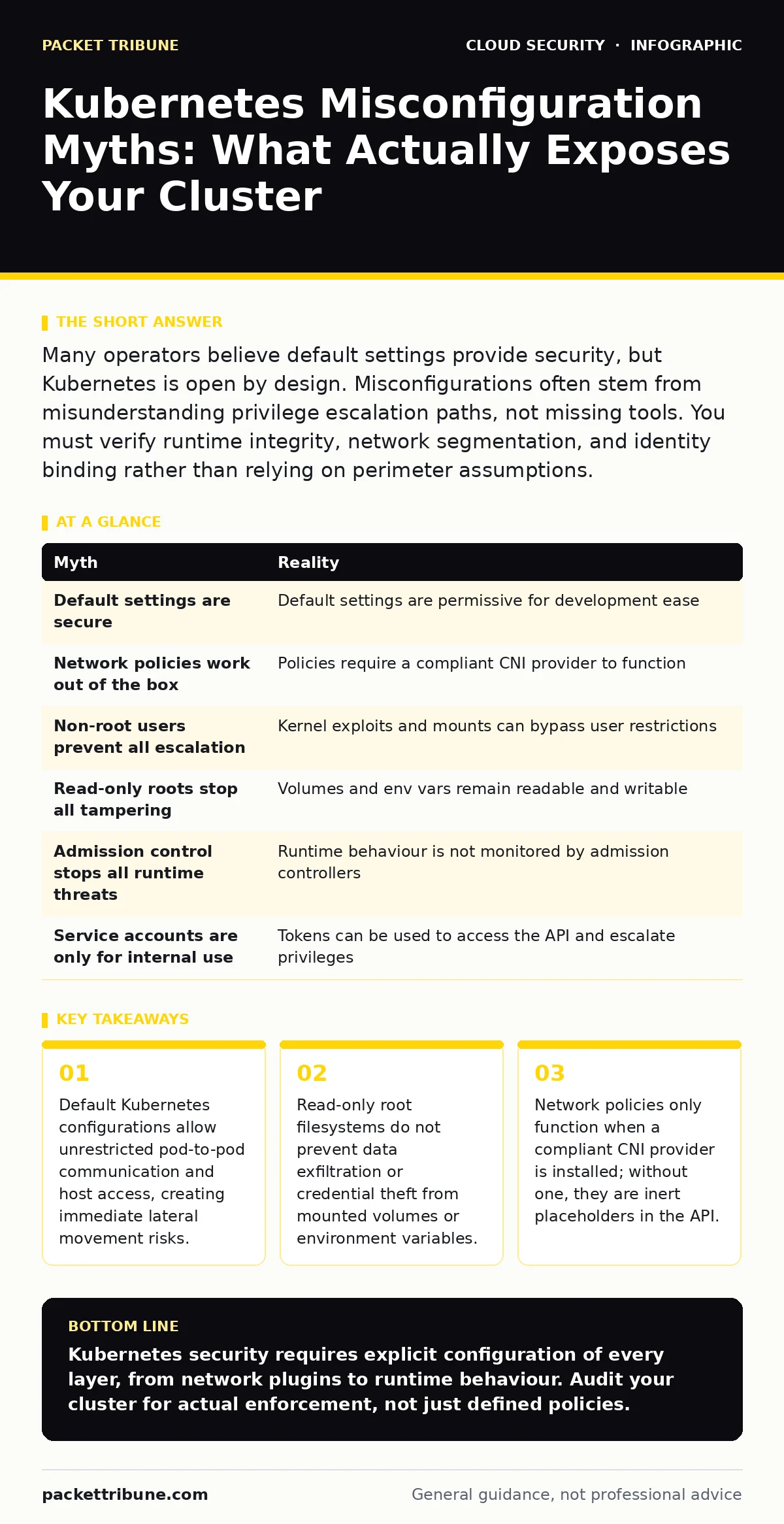
Many operators believe default settings provide security, but Kubernetes is open by design. Misconfigurations often stem from misunderstanding privilege escalation paths, not missing tools. You must verify runtime integrity, network segmentation, and identity binding rather than relying on perimeter assumptions.
Myth: Default Kubernetes Security Is Sufficient for Production Workloads
Reality: Kubernetes ships with a permissive default posture to ease development, not to secure production. The assumption that the platform is secure out of the box ignores the principle of least privilege, which requires explicit denial of access. By default, pods can often read the node’s API credentials and access the host’s filesystem if specific mounts are present. This openness facilitates rapid deployment but creates a wide attack surface for any compromised container.
Imagine a developer deploys a test application without specifying security contexts. The container runs with default privileges, allowing it to read sensitive data from other pods on the same node. This is not a bug; it is the intended default behaviour for ease of use. You must explicitly restrict capabilities and drop root privileges to mitigate this risk.
Myth: Network Policies Are Enabled and Effective by Default
Reality: Network policies are inert until a compliant Container Network Interface (CNI) provider is installed and configured. Many operators define network policy objects in their manifests, believing this enforces segmentation. However, if the underlying network plugin does not support policy enforcement, these rules are ignored entirely. Traffic flows freely between all pods regardless of the defined rules.
This misconception leads to a false sense of isolation. You may see policies in your cluster audit, but no actual filtering occurs. To verify effectiveness, you must test connectivity between pods that should be isolated. If traffic passes, your CNI provider is not enforcing the policies, or the policies are misapplied.
Myth: Running Containers as Non-Root Prevents Privilege Escalation
Reality: While running as a non-root user mitigates some risks, it does not prevent all privilege escalation paths. An attacker can exploit kernel vulnerabilities, use setuid binaries, or manipulate mounted volumes to gain higher privileges. The container’s user ID is just one layer of defence, easily bypassed if the host kernel is vulnerable or if the container has access to the Docker socket.
Suppose a container runs as user ID 1000. An attacker inside the container finds a vulnerability in a shared library that allows code execution. They can still interact with the host if the container is granted access to sensitive host paths. You must combine non-root execution with read-only filesystems and restricted capabilities for meaningful protection.
Myth: Read-Only Root Filesystems Stop Data Tampering and Exfiltration
Reality: A read-only root filesystem prevents writes to the container’s base image, but it does not protect mounted volumes or environment variables. Attackers can still read sensitive data from config maps, secrets, or mounted host directories. They can also write to temporary directories if those are not explicitly restricted. This limitation is often overlooked when designing security controls.
Imagine an attacker gains access to a container with a read-only root. They cannot modify the application binary, but they can read the database credentials stored in an environment variable. They then exfiltrate these credentials to an external server. You must treat all data within the container as potentially accessible and encrypt secrets at rest.
Myth: Pod Security Standards Eliminate the Need for Runtime Protection
Reality: Pod Security Standards enforce admission control, preventing insecure pods from being scheduled. However, they do not monitor runtime behaviour or detect post-compromise activity. An attacker can exploit a zero-day vulnerability in an allowed pod or manipulate the runtime environment after admission. Admission control is a gatekeeper, not a continuous monitor.
This gap is where many breaches occur. You may have strict admission policies, but once a pod is running, its behaviour is largely unchecked. You need runtime security tools to detect anomalous system calls, file modifications, or network connections. This complements the static enforcement of admission controllers.
See also: How Misconfigured IAM Roles Work: The Step-by-Step Attack Path · CSPM vs CWPP: How to Choose Cloud Security Tools
Myth: Service Account Tokens Are Only for Internal Cluster Communication
Reality: Service account tokens provide authentication to the Kubernetes API server, not just internal services. If a pod’s service account token is exposed, an attacker can query the API for sensitive information, list secrets, or even escalate privileges if the account has excessive permissions. These tokens are mounted by default in every pod, creating a persistent risk.
Suppose an attacker compromises a web server pod. They find the mounted service account token and use it to query the API server. If the token has broad permissions, they can access secrets from other namespaces. You must restrict service account permissions and disable automatic token mounting where possible.
| Myth | Reality |
|---|---|
| Default settings are secure | Default settings are permissive for development ease |
| Network policies work out of the box | Policies require a compliant CNI provider to function |
| Non-root users prevent all escalation | Kernel exploits and mounts can bypass user restrictions |
| Read-only roots stop all tampering | Volumes and env vars remain readable and writable |
| Admission control stops all runtime threats | Runtime behaviour is not monitored by admission controllers |
| Service accounts are only for internal use | Tokens can be used to access the API and escalate privileges |
Key takeaways
- Default Kubernetes configurations allow unrestricted pod-to-pod communication and host access, creating immediate lateral movement risks.
- Read-only root filesystems do not prevent data exfiltration or credential theft from mounted volumes or environment variables.
- Network policies only function when a compliant CNI provider is installed; without one, they are inert placeholders in the API.
Kubernetes security requires explicit configuration of every layer, from network plugins to runtime behaviour. Audit your cluster for actual enforcement, not just defined policies.
Frequently asked questions
How do I verify if my network policies are actually working?
Deploy two pods in different namespaces with a policy denying traffic between them. Attempt to connect from one to the other using a tool like curl or nc. If the connection succeeds, your CNI provider is not enforcing the policy.
What is the risk of mounting the Docker socket into a container?
Mounting the Docker socket grants the container full control over the container runtime on the host. This effectively gives the container root access to the entire node, allowing it to spawn new containers, read host files, and escape the container environment.
Can I rely solely on Pod Security Standards for security?
No. Pod Security Standards prevent insecure pods from being scheduled but do not monitor runtime activity. You need additional runtime protection to detect and respond to threats that occur after a pod is running.
How do I restrict service account permissions?
Use Role-Based Access Control (RBAC) to define minimal permissions for each service account. Bind these roles to specific namespaces and avoid using cluster-admin privileges. Disable automatic token mounting for pods that do not need API access.
How this guide was produced: written by the Packet Tribune editorial team with AI assistance, checked against the public references listed below, and reviewed when the facts change. See our editorial policy or report an error.