Screen Locker Ransomware Mechanics: How It Bypasses OS Controls
Screen lockers exploit the separation between the graphical interface and the kernel, allowing attackers to hijack display output without needing root privileges to encrypt files.

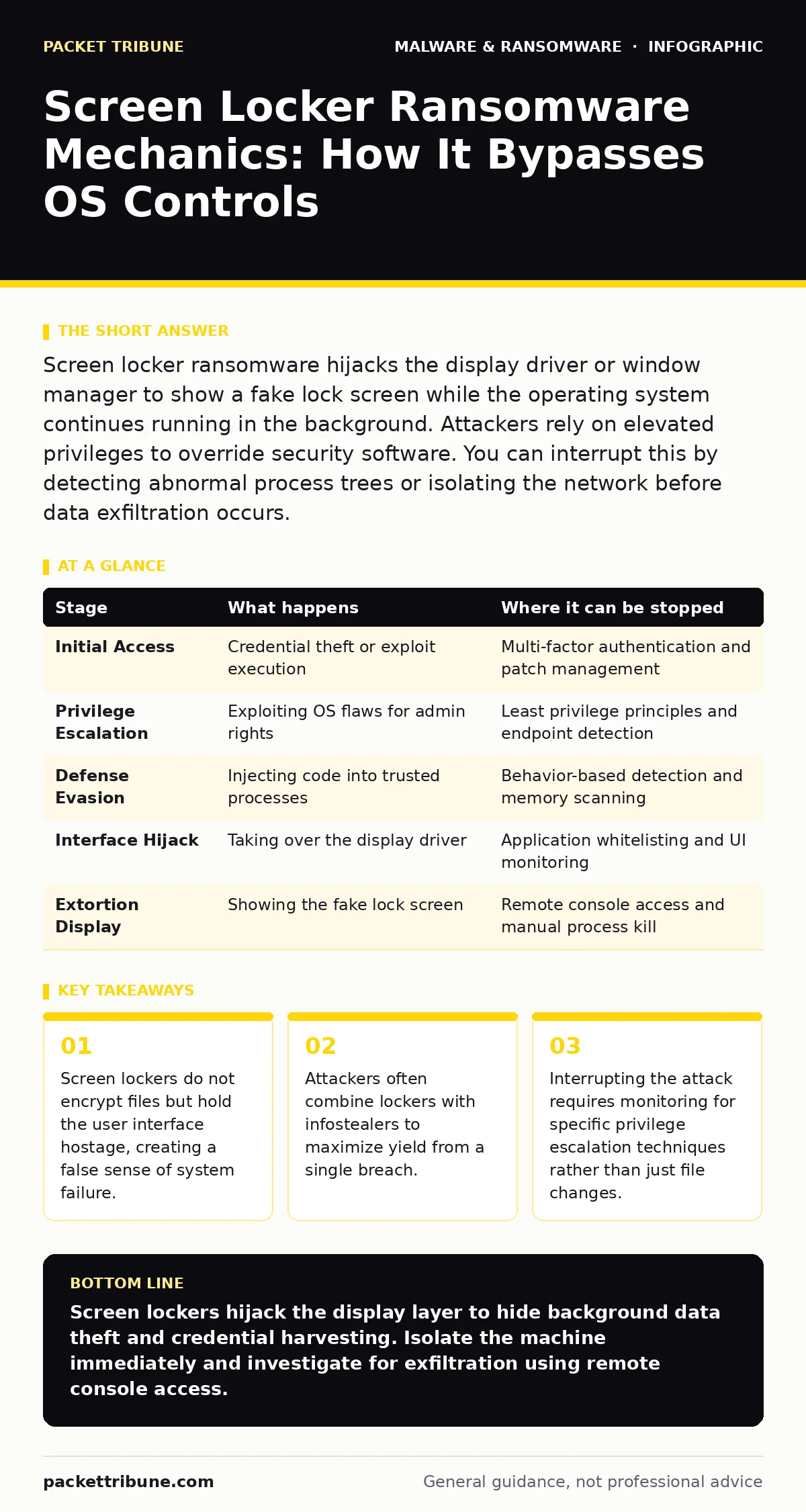
Screen locker ransomware hijacks the display driver or window manager to show a fake lock screen while the operating system continues running in the background. Attackers rely on elevated privileges to override security software. You can interrupt this by detecting abnormal process trees or isolating the network before data exfiltration occurs.
The Interface Hijack Mechanism
Screen locker ransomware operates differently from traditional encryption malware. It does not scramble your data. Instead, it captures the graphical user interface to prevent interaction. The operating system continues to function normally in the background. Applications remain open. Network connections stay active. The attacker displays a full-screen window that mimics the system lock screen. This window usually demands payment to restore access. The deception relies on the user believing the entire machine has failed. In reality, only the display layer is compromised.
The attacker achieves this by exploiting the window manager or display server. On Windows systems, this often involves injecting code into the explorer.exe process or using the LockWorkStation API. On Linux, the attacker might target the X Window System or Wayland compositor. The goal is to ensure the malicious window stays on top of all other applications. Standard keyboard shortcuts like Alt-Tab or Ctrl-Alt-Del are disabled or intercepted. The user cannot switch tasks or open a command prompt through the normal interface.
Stage 1: Initial Access and Privilege Escalation
The attack begins with gaining a foothold on the target machine. Attackers rarely rely on a single vulnerability. They often use a combination of phishing emails, exploited remote desktop protocol weaknesses, or compromised credentials. Once inside, the malware runs with the privileges of the logged-in user. This is insufficient for a full screen lock. The malware must escalate privileges to interact with system-level display drivers.
Privilege escalation is the critical hurdle. The malware searches for known vulnerabilities in the operating system kernel or installed applications. It may exploit a misconfigured service that runs with administrative rights. If successful, the process gains higher privileges. This allows it to bypass standard user restrictions. Without this step, the operating system would simply close the malicious window if the user logged out. The attacker needs persistence and control that survives user session changes.
Stage 2: Defense Evasion and Process Injection
With elevated privileges, the malware prepares to hide its activity. Security solutions often monitor for new processes launching from suspicious directories. To avoid detection, the attacker uses process injection. This technique involves writing the malicious code into the memory space of a legitimate, trusted process. Common targets include system services or essential background tasks. The malware piggybacks on the trusted process. It inherits the process’s permissions and reputation.
This step makes static analysis difficult. The malicious code exists only in memory. There is no new executable file on the disk for antivirus software to scan. The attacker may also disable logging services to remove traces of the privilege escalation. They might manipulate the system clock to confuse timestamp-based security alerts. The goal is to create a blind spot. The security team sees normal system activity, while the malware sets the stage for the lock.
| Stage | What happens | Where it can be stopped |
|---|---|---|
| Initial Access | Credential theft or exploit execution | Multi-factor authentication and patch management |
| Privilege Escalation | Exploiting OS flaws for admin rights | Least privilege principles and endpoint detection |
| Defense Evasion | Injecting code into trusted processes | Behavior-based detection and memory scanning |
| Interface Hijack | Taking over the display driver | Application whitelisting and UI monitoring |
| Extortion Display | Showing the fake lock screen | Remote console access and manual process kill |
Stage 3: The Interface Hijack
The core of the attack occurs here. The malware hooks into the display subsystem. It intercepts input devices like the keyboard and mouse. All input is redirected to the malicious window. The user sees a static image or a video loop. The screen appears frozen. The attacker may display a timer or a threat to delete data. This psychological pressure forces the user to seek help or contact the attacker.
The malware ensures it remains the topmost window. It uses operating system calls to prevent other windows from appearing. It may also disable the task manager. This prevents the user from ending the process manually. The operating system is still responsive to network traffic. The attacker can now execute further commands remotely. The screen lock is merely the visible part of the intrusion. The hidden part is the continued access to the system.
Stage 4: Data Exfiltration and Secondary Payloads
A screen locker alone is a limited threat. The attacker can be bypassed by rebooting into safe mode or using remote administration tools. To increase leverage, the attacker often exfiltrates sensitive data. They scan the file system for documents, databases, and credentials. They compress and encrypt this data for transfer to their servers. This turns a nuisance into a double-extortion scheme.
The attacker may also install additional malware. Infostealers are common companions. These tools harvest browser cookies, saved passwords, and session tokens. This allows the attacker to access online accounts even after the screen lock is removed. The screen lock serves as a distraction. It keeps the user away from the keyboard while the malware works in the background. The real damage occurs silently, away from the frozen display.
Stage 5: Persistence and Cleanup
The attacker ensures the malware survives a reboot. They modify system registry keys or create scheduled tasks. The malware is set to launch automatically when the system starts. This guarantees the screen lock reappears if the user tries to restart the machine. The attacker may also delete shadow copies or volume backups. This removes the easiest recovery options for the IT team.
Some variants attempt to disable remote management tools. They block connections to Syslog servers or SIEM platforms. This isolates the incident. The IT team may not receive alerts about the privilege escalation or data exfiltration. The only sign is the locked screen. The attacker relies on the delay between the lock and the IT response. This window allows them to gather more data or move laterally to other systems on the network.
Interrupting the Attack Chain
You can disrupt this process at several points. The most effective defense is preventing the initial privilege escalation. Enforce least privilege principles. Ensure users do not have administrative rights on their daily workstations. This stops the malware from hooking into the display driver. Use application whitelisting to prevent unauthorized code from executing.
If the lock occurs, do not interact with the on-screen instructions. Use out-of-band methods to investigate. Remote console access tools can often see behind the screen lock. You can identify the malicious process and terminate it. Check for unusual network traffic. High outbound data transfer may indicate exfiltration. Isolate the machine from the network immediately. This stops the data theft and prevents lateral movement.
Strategic Implications for Security Teams
Screen lockers highlight a gap in traditional endpoint protection. Antivirus software focuses on file changes. Screen lockers change behavior, not files. You need behavior-based detection to spot the anomaly. Monitor for processes that attempt to hook into display drivers or disable input devices. Alert on any process that disables the task manager or remote management tools.
Integrate this defense with broader strategies. Device hardening reduces the attack surface. Browser isolation prevents the initial download. Static malware analysis helps identify new variants, but behavior monitoring catches the execution. Do not rely on a single layer. The attacker expects you to focus on the screen. Look at the network and the process tree instead.
Conclusion on Defense Posture
Understanding the mechanics of screen locker ransomware changes your response. It is not a file encryption event. It is a user interface hijack with hidden consequences. The attacker relies on your inability to see the background activity. Your defense must look beyond the screen. Monitor for privilege escalation and unusual process behavior. Isolate affected machines quickly. Investigate for data exfiltration. This approach minimizes damage and reduces the attacker’s leverage.
Key takeaways
- Screen lockers do not encrypt files but hold the user interface hostage, creating a false sense of system failure.
- Attackers often combine lockers with infostealers to maximize yield from a single breach.
- Interrupting the attack requires monitoring for specific privilege escalation techniques rather than just file changes.
Screen lockers hijack the display layer to hide background data theft and credential harvesting. Isolate the machine immediately and investigate for exfiltration using remote console access.
Frequently asked questions
Can a screen locker be removed by rebooting?
Rebooting may remove the lock screen, but the malware often persists via registry keys or scheduled tasks. Some variants may also trigger file encryption upon reboot.
Does a screen locker encrypt files?
No, screen lockers primarily hijack the user interface. However, attackers often combine them with file encryption malware or data exfiltration tools to increase pressure.
How do I know if my system is compromised?
Look for signs of privilege escalation, unusual network traffic, or processes hooking into display drivers. Security alerts for disabled logging or remote management tools are strong indicators.
Is multi-factor authentication effective against this?
MFA helps prevent initial access via stolen credentials. However, if the attacker exploits a software vulnerability, MFA will not stop the intrusion. Patch management is also required.
How this guide was produced: written by the Packet Tribune editorial team with AI assistance, checked against the public references listed below, and reviewed when the facts change. See our editorial policy or report an error.