Domain Name Security Explained: Prevent Account Hijacking
Your domain registrar account is the single point of failure that can redirect all your traffic, regardless of how secure your servers are.
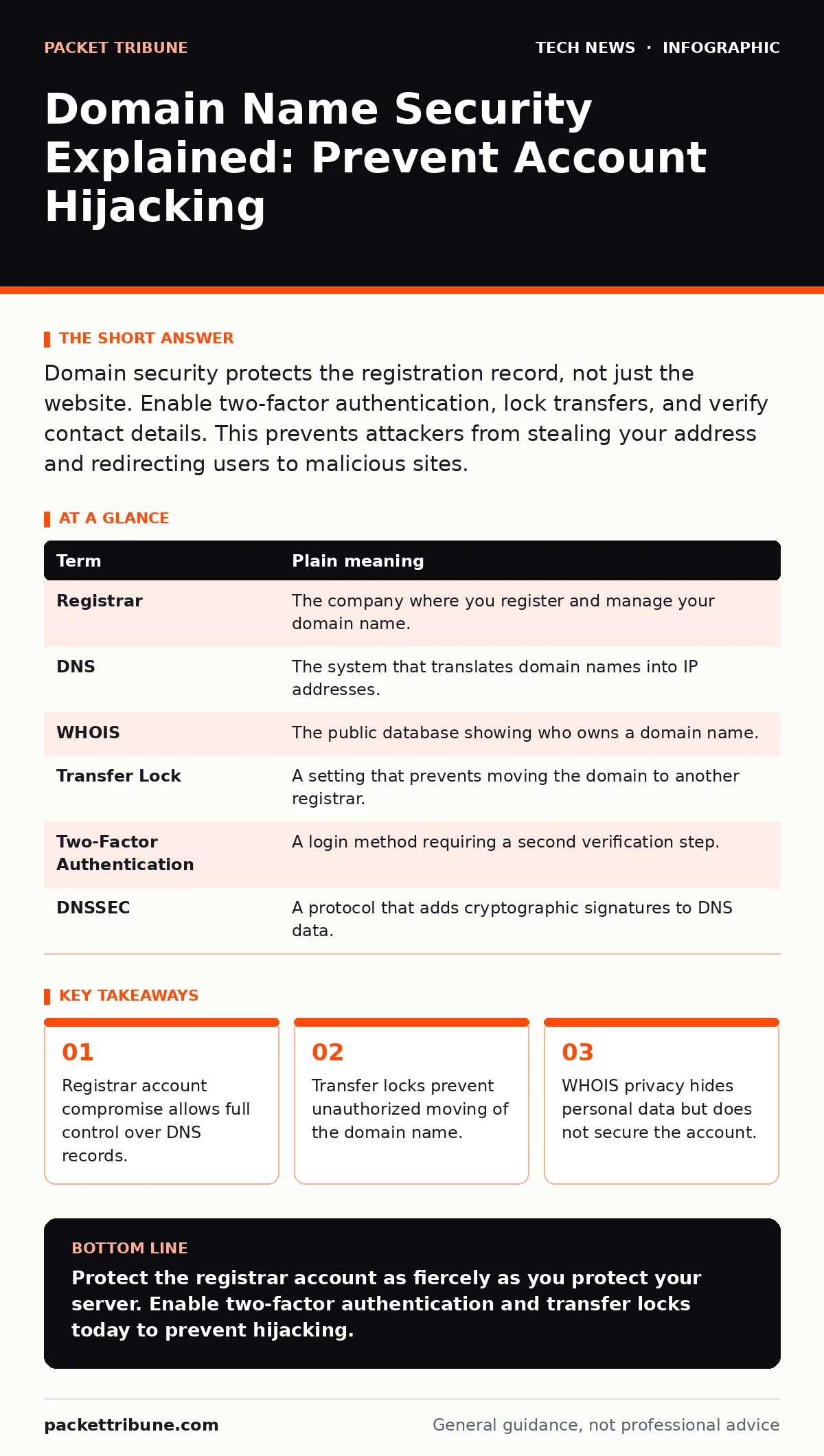
Domain security protects the registration record, not just the website. Enable two-factor authentication, lock transfers, and verify contact details. This prevents attackers from stealing your address and redirecting users to malicious sites.
The Address Book Analogy
Imagine your domain name is a physical address for a house. The house itself is your server, and the website is the furniture inside. You can install bulletproof doors and alarms on the house, but this does not matter if someone changes the address in the public directory.
If an attacker updates the directory to point your street name to their warehouse, all visitors will go there instead. Your house remains secure, but no one can find it. This is the core risk of domain name security. You must protect the registration record, not just the content it serves.
The Hidden Attack Surface
Most security efforts focus on the web server or the application code. This leaves the domain registration layer exposed. The domain registrar holds the administrative rights to your name. If an attacker gains access to this account, they can change where the name points.
They can redirect traffic to a phishing site that looks identical to yours. Users will enter their credentials into the fake site, believing it is legitimate. This bypasses all server-side protections you have implemented. The attack happens before the connection even reaches your infrastructure.
Essential Terminology
Understanding the components helps you secure them. Here are the key terms you need to know.
| Term | Plain meaning |
|---|---|
| Registrar | The company where you register and manage your domain name. |
| DNS | The system that translates domain names into IP addresses. |
| WHOIS | The public database showing who owns a domain name. |
| Transfer Lock | A setting that prevents moving the domain to another registrar. |
| Two-Factor Authentication | A login method requiring a second verification step. |
| DNSSEC | A protocol that adds cryptographic signatures to DNS data. |
The Cost of Privacy
Many users enable WHOIS privacy to hide their personal contact details from the public. This is a sensible step for privacy, but it introduces a security edge case. If your account is compromised, the attacker can change the administrative email address.
You may not receive the notification emails confirming the change. By the time you notice the issue, the attacker may have initiated a transfer. The privacy shield becomes a blind spot. Ensure your recovery methods are robust and independent of the compromised account.
Securing the Registrar Account
The first line of defence is the login credentials for your registrar. Use a unique password that you do not use anywhere else. This isolates the risk if another site is breached.
Enable two-factor authentication immediately. This requires a code from your phone or a hardware token in addition to your password. It stops attackers who have stolen your password from logging in. This is more effective than any password complexity rule.
See also: OAuth vs API Key: When to Use Tokens and When to Use Secrets · Different Types of Load Balancers: Architecture and Selection
Preventing Domain Theft
Even with a secure login, domains can be moved to other registrars. This is called a transfer. Attackers often try this to take ownership completely.
Enable the transfer lock feature in your registrar account. This setting blocks any request to move the domain. You must manually disable it to initiate a legitimate transfer. It adds a friction layer that stops automated theft attempts.
Verifying Contact Information
Your domain registration requires contact details for administrative purposes. These details must be accurate and accessible. If an attacker changes them, you lose control.
Regularly audit your contact information. Ensure the email address listed is one you check daily. Consider using a dedicated email alias for domain management. This helps you spot unauthorized changes quickly.
Practical Steps to Take Now
You can improve your domain security in minutes. Follow these steps to reduce your risk significantly.
- Log in to your registrar account and enable two-factor authentication.
- Check the transfer lock status and ensure it is active.
- Verify that the administrative email address is current and secure.
Beyond Basic Registration
Securing the registration is the foundation, but further layers add resilience. You can implement DNSSEC to prevent DNS spoofing. This adds cryptographic signatures to your DNS data, ensuring it has not been tampered with.
You might also consider TLS handshake security for your website connections. While this protects data in transit, it does not protect the domain name itself. Both measures are necessary for a complete defence.
For deeper protection of your devices, look into Trusted Platform Modules to secure boot processes. This ensures your local systems are not compromised, reducing the risk of credential theft.
Related Security Measures
Domain security does not exist in isolation. It works alongside other controls. Regular software updates patch vulnerabilities that could lead to server compromise. If your server is hacked, attackers might try to pivot to your domain registrar.
Network access control limits who can connect to your infrastructure. This reduces the attack surface. BitLocker protects your local drives if your laptop is stolen. This prevents attackers from accessing saved credentials for your registrar account.
Key takeaways
- Registrar account compromise allows full control over DNS records.
- Transfer locks prevent unauthorized moving of the domain name.
- WHOIS privacy hides personal data but does not secure the account.
Protect the registrar account as fiercely as you protect your server. Enable two-factor authentication and transfer locks today to prevent hijacking.
Frequently asked questions
Does WHOIS privacy protect my domain from hackers?
No, it only hides your personal details from the public. It does not stop account compromise or unauthorized transfers.
Can I recover a stolen domain?
Recovery is difficult and often impossible. Preventing theft via transfer locks and strong authentication is far more effective.
Is two-factor authentication enough?
It is a strong measure, but you must also use unique passwords and monitor for unauthorized changes to contact details.
What is DNSSEC and do I need it?
DNSSEC prevents DNS spoofing by verifying data integrity. It is recommended for all domains to ensure users reach the correct server.
How this guide was produced: written by the Packet Tribune editorial team with AI assistance, checked against the public references listed below, and reviewed when the facts change. See our editorial policy or report an error.