Dependency Scanning Implementation: From Policy to Pipeline
Scanning fails when it treats transitive dependencies as optional, allowing hidden supply chain risks to bypass your primary security controls.

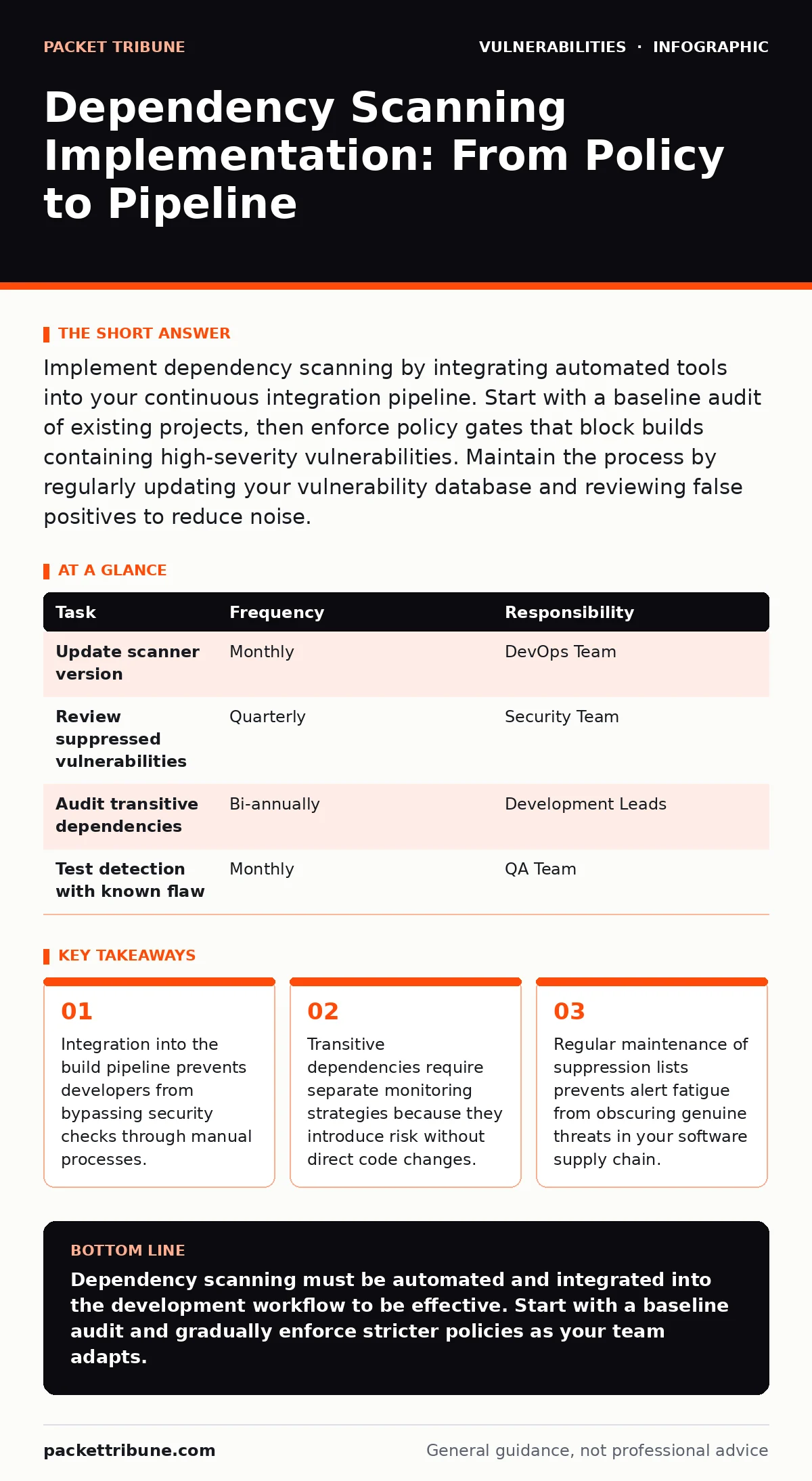
Implement dependency scanning by integrating automated tools into your continuous integration pipeline. Start with a baseline audit of existing projects, then enforce policy gates that block builds containing high-severity vulnerabilities. Maintain the process by regularly updating your vulnerability database and reviewing false positives to reduce noise.
Defining the Scope of Dependency Analysis
Dependency scanning identifies known vulnerabilities in the libraries and frameworks your application uses. You must decide whether to scan only direct dependencies or include transitive dependencies. Transitive dependencies are libraries that your direct dependencies rely on. Ignoring these creates a blind spot where a secure direct library masks an insecure underlying component.
Imagine a web application using a popular authentication framework. That framework uses a cryptographic library. If the cryptographic library has a flaw, the authentication framework is vulnerable even though its own code is correct. Your scanning strategy must cover the entire dependency tree to catch these indirect risks.
Preparing the Infrastructure for Scanning
Before installing scanners, you need a centralised location for vulnerability data. Most tools rely on external databases to match package versions against known flaws. You should verify that your tool connects to trusted sources such as CVE Numbering Authorities to ensure data accuracy.
You also need to define your risk tolerance. Not all vulnerabilities are equal. A flaw in an internal tool carries less risk than one in a customer-facing service. Establish clear criteria for which severity levels trigger a build failure. This prevents development teams from halting progress over minor issues that require no immediate remediation.
Step 1: Baseline Your Existing Codebase
Step 1: Run a Full Repository Audit
Begin by running a comprehensive scan across all active repositories. Do not block builds during this phase. The goal is to identify the current state of security technical debt. You will likely find hundreds of issues. This initial report serves as your baseline for measuring improvement.
Check the output for completeness. Verify that the scanner detected packages in both development and production environments. If the scanner misses private repositories or internal package registries, adjust your configuration. A partial scan gives a false sense of security.
Step 2: Integrate Scanning into the Build Pipeline
Step 2: Automate Scans on Every Commit
Integrate the scanner into your continuous integration pipeline. The scan must run automatically whenever a developer pushes code. This ensures that new vulnerabilities are caught before they merge into the main branch. Manual scans are easily forgotten and create gaps in your defence.
Configure the pipeline to fail only on critical or high-severity findings. Lower severity issues should generate warnings but not stop the build. This balance keeps developers engaged without frustrating them with noise. You can refine these thresholds as your team matures.
Step 3: Enforce Policy Gates
Step 3: Define and Apply Remediation Policies
Create a policy that dictates how vulnerabilities are handled. For example, require a fix within 48 hours for critical issues in production code. For lower severity issues, allow a longer window or permit suppression with justification. Document these policies clearly so every team member understands the expectations.
Use the scanner’s suppression feature carefully. Suppressing a vulnerability means you accept the risk. Require a manager or security engineer to approve each suppression. This adds accountability and prevents developers from ignoring serious issues. Regularly review suppressed items to ensure they remain acceptable.
See also: How To Read VEX Documents Without Misinterpreting Risk · CVSS Environmental Scores: Why Base Scores Mislead Risk Teams
Step 4: Handle Transitive Dependencies
Step 4: Monitor Indirect Library Risks
Transitive dependencies are harder to manage because you do not control their versions directly. When a vulnerability is found in a transitive dependency, you must wait for the direct dependency to release an update. This delay increases your exposure window.
Prioritise updating direct dependencies that have known vulnerable transitive components. If an update is not available, consider forking the direct dependency or finding an alternative. This proactive approach reduces reliance on third-party maintainers who may be slow to respond.
Verifying the Implementation
Checklist for Operational Readiness
Use this checklist to confirm your scanning process works correctly.
- Scanner runs automatically on every pull request and merge.
- Critical vulnerabilities block the build and prevent deployment.
- Transitive dependencies are included in the scan scope.
- Suppressed vulnerabilities require approval and have expiry dates.
- Scan results are stored in a central dashboard for trend analysis.
Run a test case to verify detection. Introduce a package with a known vulnerability into a test branch. Confirm that the scanner detects it and triggers the expected response. If the scanner misses the test case, review your configuration and dependency resolution settings.
Upkeep and Continuous Improvement
Regular Maintenance of the Scanning Process
Dependency scanning is not a one-time setup. You must regularly update the scanner itself to ensure it recognises the latest vulnerabilities. Outdated scanners miss new threats and provide stale data. Schedule monthly reviews of your scanner’s version and configuration.
Review false positives quarterly. Some vulnerabilities may not apply to your specific usage of a library. Document these exceptions to reduce noise. However, avoid over-suppressing. Each suppression adds complexity and potential risk. Keep the list of exceptions minimal and well-documented.
| Task | Frequency | Responsibility |
|---|---|---|
| Update scanner version | Monthly | DevOps Team |
| Review suppressed vulnerabilities | Quarterly | Security Team |
| Audit transitive dependencies | Bi-annually | Development Leads |
| Test detection with known flaw | Monthly | QA Team |
Addressing Common Implementation Challenges
Managing Alert Fatigue and Noise
Developers ignore alerts that are irrelevant or too frequent. You must filter results to show only actionable items. Integrate scanning results directly into the code review interface. This allows developers to see vulnerabilities in context without switching tools.
Provide clear remediation guidance. Instead of just listing a vulnerability, suggest the specific version to upgrade to. This reduces the effort required to fix issues. When developers see quick wins, they are more likely to engage with the security process.
Integrating with Existing Security Tools
Combine dependency scanning with other security measures. For instance, correlate dependency issues with exposed admin panels to prioritise fixes. A vulnerable library in an administrative interface poses a higher risk than one in a public-facing static page.
Consider the impact of malicious typosquatted packages. Ensure your scanner checks for packages with names similar to legitimate ones. This helps prevent supply chain attacks where attackers mimic popular libraries. Integrating these checks provides a broader defence against various threat vectors.
Key takeaways
- Integration into the build pipeline prevents developers from bypassing security checks through manual processes.
- Transitive dependencies require separate monitoring strategies because they introduce risk without direct code changes.
- Regular maintenance of suppression lists prevents alert fatigue from obscuring genuine threats in your software supply chain.
Dependency scanning must be automated and integrated into the development workflow to be effective. Start with a baseline audit and gradually enforce stricter policies as your team adapts.
Frequently asked questions
How do I handle vulnerabilities in libraries I no longer maintain?
Isolate the application using the vulnerable library and plan for migration. If immediate migration is impossible, apply network-level controls to limit exposure.
Should I scan test and development environments?
Yes, scanning all environments catches issues early. However, you can relax policy gates in test environments to avoid blocking experimentation.
What is the difference between SAST and dependency scanning?
SAST analyses your own code for flaws, while dependency scanning checks third-party libraries. Both are needed for a complete security posture.
How often should I update my vulnerability database?
Update it automatically if possible. Manual updates are error-prone. Most tools support real-time or daily updates to ensure current data.
How this guide was produced: written by the Packet Tribune editorial team with AI assistance, checked against the public references listed below, and reviewed when the facts change. See our editorial policy or report an error.